How to Make Emotional Shayari Photo Edits on Mobile
Creating an emotional photo edit does not require professional editing skills or a computer. With a smartphone, a good photograph, suitable Hindi Shayari, and a simple editing app, you can create beautiful visuals for Instagram, WhatsApp Status, Facebook, and other social platforms.
An emotional shayari photo edit combines meaningful words with an image that matches the mood. The right background, typography, colors, and effects can turn an ordinary photograph into something personal and expressive.
What Is an Emotional Shayari Photo Edit?
An emotional Shayari photo edit is an image that combines Hindi poetry or Shayari with a photograph, background, text effects, and visual adjustments. These edits are commonly created around themes such as heartbreak, loneliness, memories, separation, love, and life.
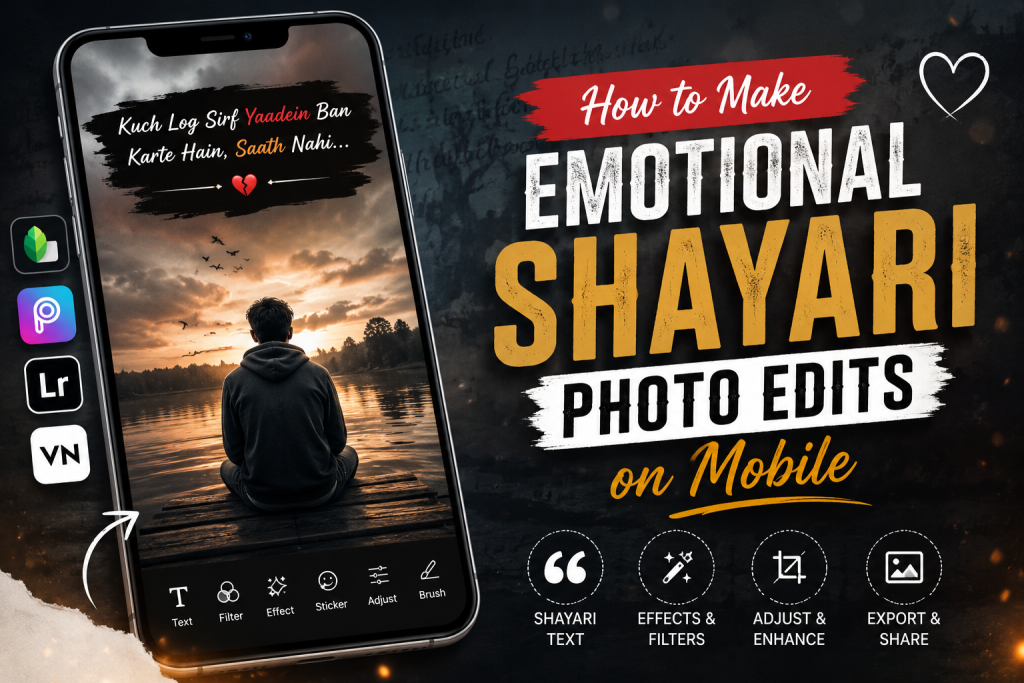
The most effective designs are usually simple. Instead of filling the image with multiple effects, focus on making the Shayari readable and allowing the photograph to support its emotion.
For example:
“कुछ रिश्ते अधूरे ही अच्छे लगते हैं,
पूरे हो जाएँ तो शायद दर्द कम हो जाए।”
A simple dark background, soft lighting, and clean Hindi typography can make these lines much more impactful.
What You Need to Create a Shayari Photo Edit
Before starting, prepare these basic elements:
- A clear photo or suitable background
- A short Hindi Shayari
- A mobile photo-editing app
- A readable Hindi font
- Suitable text color
- A few subtle effects
- The correct image size for your social platform
Apps such as CapCut provide tools for importing photographs, adding text, changing fonts, adjusting colors, applying effects, and exporting the finished design.
Step-by-Step: How to Make an Emotional Shayari Photo Edit
1. Choose the Right Photo
Start with a photograph that matches the emotion of your Shayari.
For sad or emotional content, photographs featuring:
- Rain
- Empty roads
- Sunset
- A lonely person
- Clouds
- Night scenes
- Old memories
- Black-and-white portraits
can work particularly well.
However, the photo does not have to be obviously sad. A simple portrait with a blurred background can also create an emotional atmosphere.
The important thing is to avoid a background that is too busy because it can make the Hindi text difficult to read.
2. Select a Short Shayari
Short Shayari usually works better on photographs because viewers can read it quickly.
For example:
“दिल तो आज भी वही है,
बस अब किसी पर भरोसा नहीं करता।”
Or:
“यादें तो रोज़ आती हैं,
बस अब कोई बात करने वाला नहीं।”
If you want to use longer poetry, divide it into two or three sections rather than placing a large paragraph over one photograph.
3. Import the Photo Into Your Editing App
Open your preferred photo-editing application and import the selected image.
For a social media post, choose the appropriate canvas size before beginning the design. This helps prevent important parts of the photograph or text from being cropped when the image is uploaded.
On mobile editing apps, the general workflow is straightforward: select the photograph, open the editing tools, add text, customize the typography, and export the final image.
4. Add the Hindi Shayari
Use the Text option to add your Shayari to the image.
Hindi text should be large enough to read on a mobile screen. Avoid extremely decorative fonts if they make Devanagari characters difficult to recognize.
A clean design could look like:
“जिसे अपना समझा,
वही सबसे दूर निकल गया।”
Keep the lines separated so the viewer can understand them immediately.
5. Choose a Suitable Font
Typography plays an important role in emotional photo editing.
For Hindi Shayari, choose a font that is:
- Easy to read
- Simple
- Well-spaced
- Suitable for the mood
- Clearly visible against the background
A handwritten or calligraphy-style font can work for artistic designs, while a clean font is usually better for longer Shayari.
Do not use several different fonts in one image. One primary font and perhaps one supporting style are usually enough.
6. Make the Text Stand Out
Text should contrast with the photograph.
For a dark image, white or light-colored text can work well. For a bright background, use darker text or add a subtle background layer behind the words.
You can also use:
- Text shadows
- Stroke or outline
- Slight opacity adjustments
- Transparent text backgrounds
- Soft glow effects
The goal is readability rather than excessive decoration. Text-overlay guidance also recommends maintaining contrast and avoiding placement over important parts of the image.
7. Position the Shayari Carefully
Do not automatically place the text in the center.
Look at the composition of the photograph first. If the person is positioned on the right side, for example, the empty space on the left may be the ideal location for the Shayari.
Keep the text away from:
- Faces
- Important objects
- Busy backgrounds
- Social-media interface areas
- The edges of the image
Good spacing makes the edit look cleaner and more professional.
8. Add a Dark or Soft Overlay
Sometimes the original photograph is too bright or colorful for emotional Shayari.
In that situation, add a subtle dark overlay or reduce the image brightness slightly. This can create a cinematic appearance while improving text readability.
Black-and-white or muted-color effects can also work well for themes involving memories, loneliness, and heartbreak.
However, avoid adding too many filters. The photograph should still look natural.
9. Use Effects in Moderation
Effects can improve a Shayari edit, but excessive effects can make it look artificial.
You can experiment with:
- Blur
- Grain
- Vignette
- Light leaks
- Soft glow
- Film effects
- Black-and-white filters
- Slow fade-style visual treatments
The best emotional edits often use only a few subtle adjustments.
CapCut, for example, provides text styles, fonts, filters, shapes, opacity controls, and other editing options that can be combined to create customized photo designs.
Best Emotional Shayari Ideas for Photo Editing
Here are some original-style examples that can be adapted for different photo moods.
Heartbreak Shayari
“टूटकर चाहा था जिसे,
वही हमें तोड़कर चला गया।”
Loneliness Shayari
“भीड़ में भी अकेले हैं हम,
क्योंकि अपना कहने वाला कोई नहीं।”
Memories Shayari
“कुछ यादें तस्वीरों में नहीं,
सीधे दिल में कैद होती हैं।”
Life Shayari
“वक्त ने बहुत कुछ सिखा दिया,
अब किसी से उम्मीद नहीं रखते।”
Silent Love Shayari
“कहना बहुत कुछ था तुमसे,
मगर खामोशी ही बेहतर लगी।”
These short lines are suitable for image overlays because they communicate an emotion without overcrowding the design.
How to Create a Professional-Looking Shayari Edit
A professional-looking design is more about balance than complicated effects.
Follow these simple rules:
- Use one strong photograph.
- Keep the Shayari short.
- Choose a readable Hindi font.
- Maintain strong contrast.
- Leave enough empty space around the text.
- Avoid covering the person’s face.
- Use only a few visual effects.
- Preview the image on a small phone screen before publishing.
If the text can be read comfortably on a small screen, your design is much more likely to work well for social media.
Emotional Shayari Photo Edit Ideas for Instagram
Instagram users can experiment with several formats, including:
- Single-photo Shayari posts
- Carousel Shayari designs
- Emotional Story backgrounds
- Shayari Reels
- Couple-photo edits
- Black-and-white poetry edits
- Cinematic quote designs
For Reels, you can also turn a static Shayari design into a short video by adding transitions, subtle zoom effects, background music, and animated text. Templates specifically designed around sad Shayari and poetry are also available in mobile editing ecosystems.
Emotional Shayari for WhatsApp Status
For WhatsApp Status, keep the design simple and readable because viewers often see the content quickly.
A short Shayari such as:
“वो बदल गए तो क्या हुआ,
हमने भी उम्मीद करना छोड़ दिया।”
can work well with a dark portrait, blurred background, and centered white typography.
Vertical designs are particularly convenient for status content because they use the phone screen more effectively.
Common Mistakes to Avoid
Using Too Much Text
Long paragraphs can make an image difficult to understand, especially when the design is meant to deliver a quick emotional message. Instead, choose one meaningful thought and keep the wording simple. If you come across abbreviations or short forms while preparing your text, checking the fr meaning website can help you understand the context and use it appropriately in your Shayari edit.
Using Too Many Fonts
Different fonts competing for attention can make the design look messy.
Poor Text Contrast
Beautiful typography is useless if viewers cannot read it.
Overusing Effects
Heavy glow, excessive blur, stickers, and animations can distract from the Shayari.
Ignoring Image Quality
Always start with a reasonably sharp photograph. Adding text to a low-resolution image will not make it look professional.
Final Tips
Making an emotional Shayari photo edit on mobile is mainly about matching the words with the visual mood. Start with a suitable photograph, choose a short Hindi Shayari, use readable typography, and make small adjustments to brightness, contrast, and color.
You can also explore more examples and inspiration through emotional shayari before choosing the perfect lines for your next design.
Remember, the strongest Shayari edits are not necessarily the ones with the most effects. A clean photograph, meaningful words, good spacing, and subtle editing can create a much stronger emotional connection with the viewer.