Studio Background AI Photo Editing: Free Prompts for Professional Photos (2026)
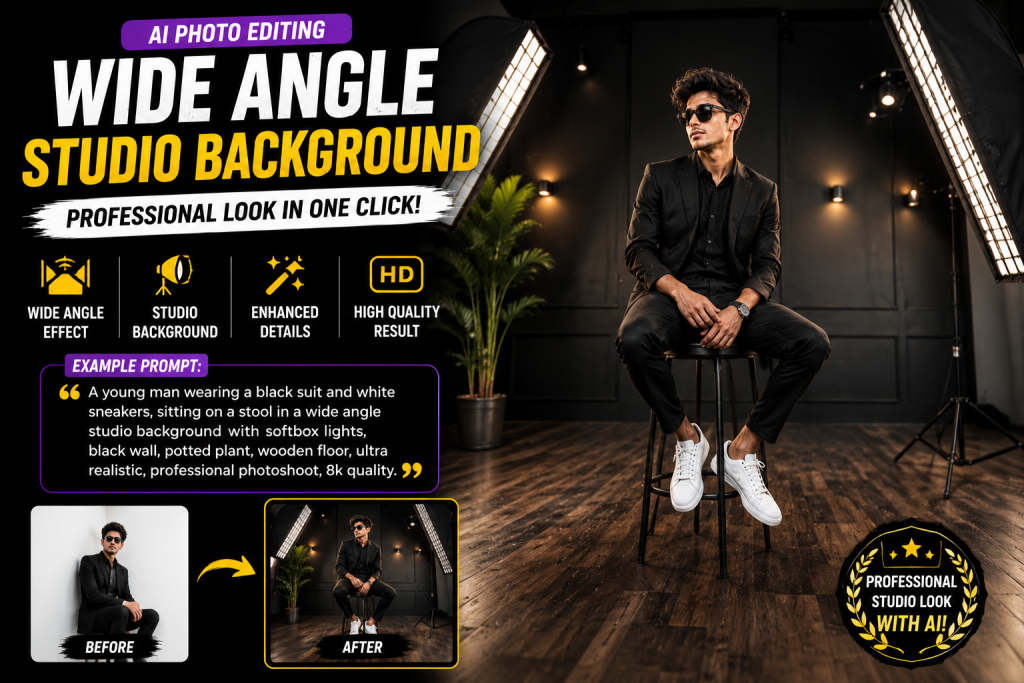
Studio background wali photos hamesha clean aur professional lagti hain, jaise kisi photographer ne studio me click ki ho. Lekin sach ye hai ki aapko studio jane ki zarurat nahi. AI ki madad se aap apni normal photo ko ek perfect studio background look de sakte ho.
Studio background AI photo editing ka matlab hai AI tool ki madad se apni photo ka background hata kar usme ek clean studio backdrop add karna, sahi lighting ke saath. Aap bas apni photo upload karte ho, ek prompt paste karte ho, aur AI studio-quality photo bana deta hai.
Is guide me aapko studio background ke liye ready prompts, best tools, aur perfect result paane ke tips milenge.
What Is Studio Background AI Photo Editing?
Ye ek editing style hai jisme aapki photo ka original background hata diya jata hai aur uski jagah ek clean studio backdrop (white, grey, ya gradient) add kiya jata hai. AI lighting aur shadows bhi automatically match kar deta hai taki photo natural lage. Ye look LinkedIn, resume, aur professional profiles ke liye perfect hai.
Studio Background Prompts to Copy
White Studio Background Prompt
Edit my uploaded photo with a clean white studio background. Add soft, even studio lighting with gentle shadows behind the subject. Keep my face, outfit, and pose exactly the same. Apply subtle skin smoothing and sharp focus. Output in HD, 4:5 aspect ratio, professional studio look.Grey Gradient Studio Prompt
Replace the background of my uploaded photo with a smooth grey gradient studio backdrop. Add professional three-point studio lighting, soft shadows, and a clean editorial look. Keep the original face 100% match. Output in 4K, 4:5 ratio.Colored Studio Background Prompt
Edit my uploaded photo with a solid colored studio background in deep blue. Add soft rim lighting around the subject and a clean fashion-studio vibe. Keep my face, hairstyle, and outfit the same. Output in HD, realistic, 4:5 ratio.How to Get the Best Studio Look
Clear face wali HD photo use karo. Achhi natural light me li gayi photo best result deti hai. Prompt me background color clearly mention karo. Agar shadows fake lagein to “add natural soft shadows” add karo. Aur prompts seekhne ke liye humara AI photo editing prompts guide padho.
Best Tools for Studio Background Edits
ChatGPT aur Gemini prompt-based studio edits ke liye best hain. One-click background removal ke liye Canva AI aur Remove.bg use karo. Inke baare me detail humare best AI photo editor free online guide me hai.
Why Studio Background Photos Look Professional
Studio background photos me distraction nahi hota. Plain backdrop par sirf aap focus me rehte ho, isliye photo clean aur serious lagti hai. Yahi reason hai ki companies, resumes, aur LinkedIn profiles me studio-style photos use ki jati hain.
Real studio me jaana mehnga aur time-consuming hai. Photographer ki fees, travel, aur appointment, sab effort lagta hai. AI ye sab kaam free me aur sirf kuch second me kar deta hai, wo bhi ghar baithe.
Sabse achhi baat ye hai ki AI lighting aur shadows ko bhi match karta hai. Isliye photo fake collage jaisi nahi lagti, balki ek real studio shoot jaisi lagti hai.
Best Background Colors for Different Uses
White background resume aur LinkedIn ke liye best hai kyunki ye clean aur formal lagta hai. Grey gradient corporate aur business profiles ke liye accha hai. Deep blue ya dark colors fashion aur creative profiles ke liye stylish lagte hain.
Agar aap product bechte ho to white background sabse best hai kyunki Amazon aur dusri ecommerce sites white background pasand karti hain. Apne use ke hisaab se color choose karo aur prompt me clearly likho.
Common Mistakes to Avoid
Blurry photo use karna sabse badi galti hai. Edges clean nahi aayenge. Doosri galti hai shadow na maangna, jisse photo floating lagti hai. Hamesha “add natural soft shadows” likho taki subject background me natural lage. Teesri galti hai bahut bright ya dark background choose karna jo face par attention nahi aane deta.
Upload your photo to ChatGPT, Gemini, or Canva AI, paste a studio background prompt, and the AI replaces the background with a clean studio backdrop.
Which background color is best for professional photos?
White and grey gradient backgrounds look the most professional for headshots, resumes, and LinkedIn profiles.
Is studio background editing free?
Yes. Canva AI, Remove.bg, ChatGPT, and Gemini all offer free background editing with daily limits.
Final Thoughts
Studio background AI editing se aap ghar baithe professional studio-quality photos bana sakte ho. Upar diye gaye prompts copy karo, apni photo ke saath use karo, aur clean professional look paao. Ye trick LinkedIn, resume, aur business profiles ke liye perfect hai.