Best AI Photo Editor Free Online: 12 Top Tools to Edit Photos in 2026
Ever wished you could edit photos like a pro without learning Photoshop? Most of us want clean headshots, viral Instagram posts, and product shots that pop, but software is expensive and confusing. The good news is that AI photo editors do the hard work for you in seconds, and many of them are 100% free.
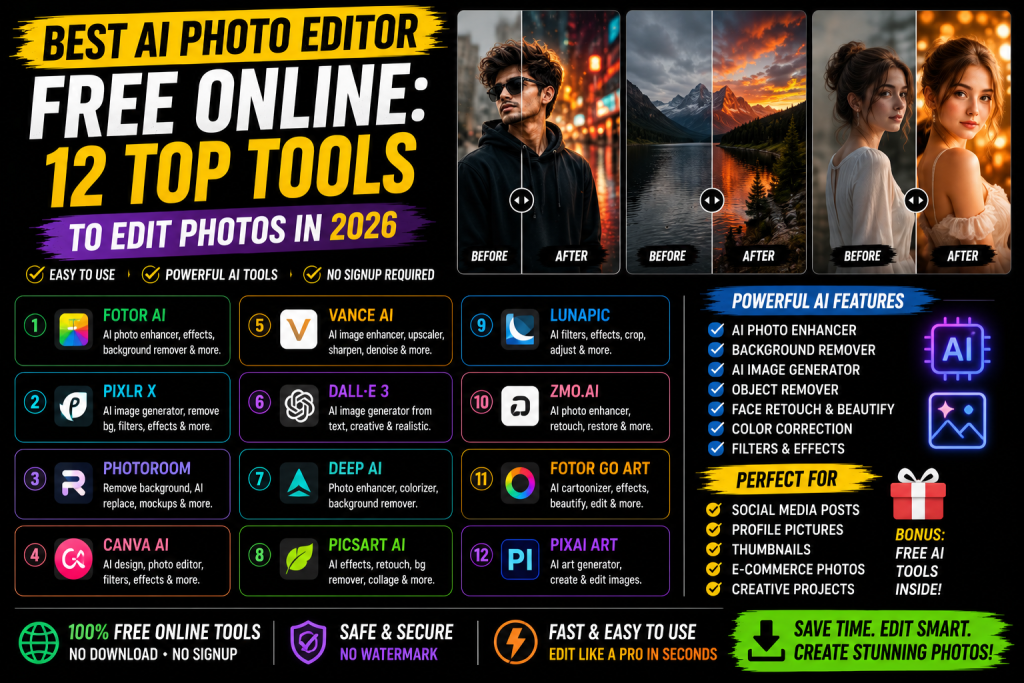
The best AI photo editor free online in 2026 includes Canva AI, Fotor AI, Picsart AI, Adobe Firefly, Pixlr, Photopea, Cleanup Pictures, Remove.bg, Pixelcut, Cutout.Pro, YouCam Online, and VanceAI. All these tools work directly in your browser, need no signup for basic edits, and let you remove backgrounds, enhance quality, and retouch faces for free.
This guide lists the top 12 free online AI photo editors, what each one does best, and step-by-step tips to use them. By the end, you will know exactly which tool to use for every kind of edit, from removing a background to fixing a blurry old photo.
What Is an AI Photo Editor? Best AI Photo Editor Free Online
An AI photo editor is a tool that uses artificial intelligence to edit photos automatically. Instead of moving sliders or learning layers in Photoshop, you upload a photo and click one button. The AI handles background removal, skin smoothing, color correction, and even object removal in seconds.
Most free AI photo editors work online in your web browser. You do not need to download software or sign up for an account for basic edits. Just open the website, upload your photo, pick what you want to change, and download the edited file.
How AI Photo Editor Free Online Are Different From Regular Editors
Regular photo editors like Photoshop or Lightroom give you full manual control. You move sliders, paint masks, and adjust every pixel by hand. It takes time and skill. AI editors skip the manual work and use machine learning to do the editing for you.
For example, removing a background by hand can take 10 to 20 minutes in Photoshop. An AI photo editor like Remove.bg does it in 5 seconds. The same goes for skin retouching, object removal, and image upscaling. AI editors trade some control for massive speed.
Why Free Online AI Editors Are So Popular
Most people only edit photos a few times a week. Paying for Photoshop is overkill for that. Free online AI editors give you the same basic results without the cost or learning curve.
They also work on any device. Phone, tablet, laptop, or office PC, you just need a browser. No downloads, no installs, no storage hogged on your device. That flexibility is why millions of people now use online AI editors every day.
12 Best AI Photo Editors Free Online in 2026
Here are the top picks worth trying right now. Each one has a clear strength, so match the tool to your task.
1. Canva AI
Canva AI is the most popular free online photo editor in the world in 2026. It offers background removal, image enhancement, AI image generation, and a huge library of design templates. The free plan covers most casual edits. Best for social media posts, resumes, and quick designs.
2. Fotor AI
Fotor AI is a clean, beginner-friendly editor with AI photo enhancement, background change, object removal, and image upscaling. The free plan gives you daily credits for AI tools. Best for quick photo cleanups and casual creators who want polished results fast.
3. Picsart AI
Picsart AI is one of the most powerful free editors online. It offers AI background removal, AI image generation, photo retouching, and creative effects. The free web version is generous, with most tools available without payment. Best for Instagram creators and social media editors.
4. Adobe Firefly
Adobe Firefly is Adobe’s free AI image tool with text-to-image, generative fill, and object removal. It is trained on licensed images, which makes the output safe for business and commercial use. Free users get daily credits. Best for serious creators who want pro-grade AI editing.
5. Pixlr
Pixlr is one of the oldest online photo editors and still going strong in 2026. The free Pixlr E version feels like Photoshop in your browser, with AI tools added on top. You can edit layers, masks, and apply AI features for free. Best for users who want desktop-style editing without installs.
6. Photopea
Photopea is a free Photoshop alternative that runs in your browser. It supports PSD files, layers, masks, and even some AI tools. There is no signup required, and most features work for free. Best for designers who need Photoshop power without paying for it.
7. Cleanup Pictures
Cleanup Pictures is a simple AI tool that removes unwanted objects, people, or text from photos. You brush over what you want gone, and the AI fills the space naturally. Free users get standard quality, while paid users get HD downloads. Best for quick object removal in seconds.
8. Remove.bg
Remove.bg is the king of one-click background removal. Upload your photo, and the AI removes the background in 5 seconds. Free downloads are limited to small sizes. Best for portraits, product photos, and quick profile pictures.
9. Pixelcut
Pixelcut is a fast AI editor focused on ecommerce sellers and content creators. It handles background removal, photo enhancement, and AI product photography. The free plan covers most basic edits. Best for small business owners selling on Amazon, Etsy, or Shopify.
10. Cutout.Pro
Cutout.Pro offers 40+ AI tools in one place. You can remove backgrounds, enhance image quality, restore old photos, retouch faces, and more. The free plan gives daily credits. Best for users who want one tool to cover every kind of edit.
11. YouCam Online
YouCam Online is the web version of the popular YouCam Perfect app. It focuses on AI face retouching, skin smoothing, makeup, and selfie enhancement. Free users get most basic features. Best for selfie creators and beauty content makers.
12. VanceAI
VanceAI offers AI image upscaling, photo restoration, sharpening, and old photo colorization. The free plan gives you a few daily credits to test the tools. Best for restoring family photos, fixing blurry images, and upscaling low-resolution pictures.
Best Free AI Photo Editor for Background Removal
For removing backgrounds, the top picks are Remove.bg, Canva AI, and Cleanup Pictures. Remove.bg is the fastest, with one-click background removal in 5 seconds. Canva AI lets you remove and replace backgrounds in the same editor. Cleanup Pictures works well if the background has small unwanted objects you also want gone.
All three handle portraits, products, and animals well. For complex edges like hair or fur, Adobe Firefly and Picsart AI give cleaner results. For a free quick fix, Remove.bg is still the easiest in 2026.
Best Free AI Photo Editor for Image Enhancement
To enhance image quality and fix blurry photos, the strongest free picks are VanceAI, Fotor, and Pixelcut. VanceAI specializes in upscaling and sharpening. Fotor offers one-click enhancement that brightens, sharpens, and balances colors automatically. Pixelcut works well for ecommerce product photos that need a quick polish.
Best Free AI Photo Editor for Face Retouching
For face retouching, skin smoothing, and selfie editing, YouCam Online, Picsart AI, and Fotor are the best free picks. YouCam Online is built for selfies, with AI makeup, blemish removal, and eye enhancement. Picsart AI offers similar features with stronger creative effects. Fotor handles skin smoothing, teeth whitening, and color correction in a beginner-friendly interface.
How to Edit Photos With Free Online AI Tools
The process is the same on most platforms. Open the website, upload your photo, pick the AI tool you want, click apply, and download. The whole thing takes under two minutes for most edits.
First, choose your tool based on the task. Second, upload your photo. Third, select the AI feature you want, like Remove Background or Enhance Image. Fourth, let the AI process the photo, usually 5 to 30 seconds. Fifth, preview the result. If it looks good, download. If not, tweak the settings or try a different tool.
If you want to go further and create dramatic edits, check our guide on AI CB editing PNG where we show you how to layer PNG files with AI tools. And if you also make videos, our guide on the best video editing apps pairs perfectly with these photo tools.
Are Free AI Photo Editors Safe to Use?
Most trusted AI photo editors are safe, but you should still follow a few simple rules. Use trusted names like Canva, Adobe, Fotor, Picsart, Pixlr, and Photopea. Avoid random websites that pop up in ads. For private photos like ID cards, use offline tools or trusted brands with strong privacy policies. Most trusted editors delete your uploaded files within an hour, so always check the privacy policy before uploading personal photos.
Frequently Asked Questions
Which is the best free AI photo editor online?
Canva AI, Fotor, and Picsart AI are the best free AI photo editors online in 2026. Each one covers a wide range of edits without paid signup.
Can I edit photos with AI for free?
Yes. Tools like Canva AI, Fotor, Picsart AI, Photopea, and Adobe Firefly offer free AI photo editing online without any download.
How do I remove the background from a photo for free?
Use Remove.bg or Canva AI. Upload your photo, click Remove Background, and download the cleaned image in seconds.
Can AI fix blurry or low-quality photos?
Yes. VanceAI, Fotor, and Pixelcut all offer AI upscaling and sharpening to fix blurry photos for free.
Are free online AI photo editors safe?
Yes, when you use trusted brands like Canva, Adobe, Fotor, and Picsart. Avoid uploading sensitive photos to unknown websites.
Final Thoughts
Free AI photo editors in 2026 are better than the paid software of five years ago. Pick the tool that fits your task. Canva AI for design, Remove.bg for backgrounds, Cleanup Pictures for object removal, and VanceAI for old photos. Save your favorites as bookmarks, and you will never need expensive software again. Start with one tool today, edit one photo, and see the results for yourself.