Royal Enfield AI Photo Editing Prompt 2026 (10+ Free Copy Paste)
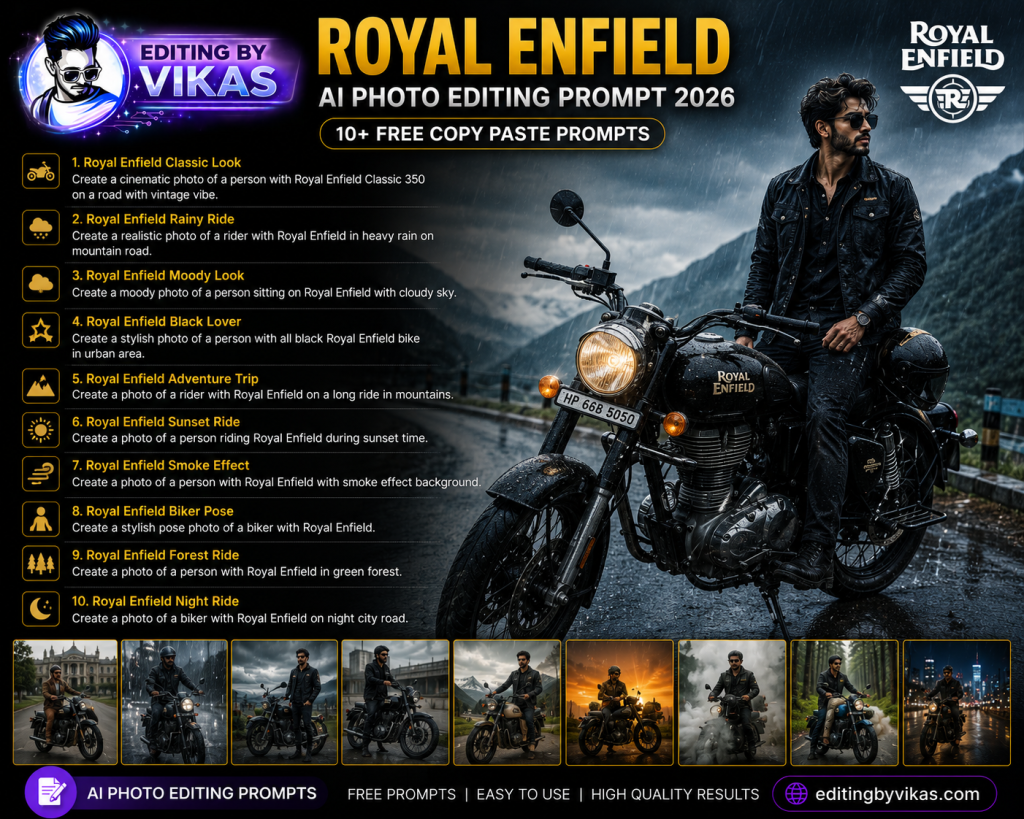
Every Royal Enfield rider knows the bond between a rider and their machine, and these Royal Enfield AI photo editing prompts turn your bike photo into a cinematic, rugged portrait. Below are more than ten copy paste prompts in one tap copy boxes, designed to add dramatic lighting, epic landscapes, and a bold rider mood while keeping your face and your own bike natural. Find more attitude styles in the black background prompts.
What Is a Royal Enfield Rider Edit?
A Royal Enfield rider edit enhances a photo of you with your classic motorcycle, adding dramatic lighting, scenic backdrops, and a rugged cinematic mood. The prompts keep your own bike and face natural, so the result celebrates your real machine rather than replacing it, giving you a powerful biker portrait worthy of any rider page.
1. Classic Rider Portrait Prompt
A rugged portrait with your classic bike.
Classic Rider Portrait Prompt
Edit this photo into a rugged cinematic Royal Enfield rider portrait. Keep the same face, outfit and the same motorcycle exactly. Add dramatic side lighting with a rim light, a moody background, deep contrast, realistic detail on the bike, a confident mood, and natural skin. Cinematic teal and orange grade, ultra sharp 4K.
2. Mountain Highway Prompt
Riding through epic mountain roads.
Mountain Highway Prompt
Edit this photo into an epic mountain highway rider portrait. Keep the same face and the same motorcycle. Add a dramatic mountain road background, golden light, a sense of adventure, realistic bike detail, a confident mood, and natural skin. High resolution, cinematic depth.
3. Misty Hills Ride Prompt
A cool, misty hill station ride.
Misty Hills Ride Prompt
Edit this photo into a misty hill ride portrait. Keep the same face and motorcycle. Add cool morning mist, a scenic hill road, soft moody light, realistic bike detail, an adventurous calm mood, and natural skin. Cinematic atmosphere, high resolution.
4. Night Street Rider Prompt
A moody night ride with neon reflections.
Night Street Rider Prompt
Edit this photo into a moody night Royal Enfield portrait. Keep the same face and motorcycle. Add a wet city street with neon and street light reflections, gentle haze, deep contrast, realistic bike detail, a confident mood, and natural skin. Ultra sharp 4K, cinematic grade.
5. Desert Adventure Prompt
An epic open desert ride.
Desert Adventure Prompt
Edit this photo into an epic desert ride portrait. Keep the same face and motorcycle. Add an open desert highway, dramatic golden sky, dust and atmosphere, warm cinematic light, realistic bike detail, an adventurous mood, and natural skin. High resolution, cinematic depth.
6. Black and Bold Studio Prompt
A premium studio shot of you and the bike.
Black and Bold Studio Prompt
Edit this photo into a bold studio Royal Enfield portrait. Keep the same face and motorcycle. Add dramatic studio lighting against a dark backdrop, strong reflections on the bike, deep shadows, realistic detail, a confident mood, and natural skin. Premium finish, ultra sharp 4K.
7. Vintage Retro Rider Prompt
A nostalgic classic film rider look.
Vintage Retro Rider Prompt
Edit this photo into a vintage retro Royal Enfield portrait. Keep the same face and motorcycle. Add warm faded film tones, soft grain, golden classic light, realistic bike detail, a timeless rugged mood, and natural skin. Authentic retro film finish, high resolution.
8. Coastal Highway Prompt
A scenic seaside ride.
Coastal Highway Prompt
Edit this photo into a coastal highway rider portrait. Keep the same face and motorcycle. Add a scenic seaside road, warm golden light, a sense of freedom, realistic bike detail, a relaxed confident mood, and natural skin. High resolution, cinematic depth.
9. Rainy Ride Prompt
A dramatic ride in the rain.
Rainy Ride Prompt
Edit this photo into a dramatic rainy Royal Enfield portrait. Keep the same face and motorcycle. Add soft rain, wet reflective road, moody clouds, warm light, realistic bike detail, an adventurous mood, and natural skin. Cinematic atmosphere, high resolution.
10. Sunset Silhouette Prompt
A striking sunset silhouette with the bike.
Sunset Silhouette Prompt
Edit this photo into a sunset silhouette rider portrait. Keep the same pose and motorcycle outline. Add a glowing sunset sky with rich tones, you and the bike as a soft silhouette, gentle rim glow, and a serene adventurous mood. High resolution, cinematic.
11. Group Ride Brotherhood Prompt
A rider group with matched lighting.
Group Ride Brotherhood Prompt
Edit this group photo into a rider brotherhood portrait. Keep all faces and motorcycles the same and keep the lighting consistent. Add a scenic road background, dramatic light, a bold adventurous mood, realistic bike detail, and natural skin tones. High resolution, cinematic depth.
How to Use These Prompts Step by Step
- Open ChatGPT and start image editing mode.
- Upload a clear, well lit photo with a simple background.
- Tap Copy on the prompt box you want and paste it into the chat.
- Attach your photo in the same message and send.
- If the result is close but not perfect, add one short instruction such as keep the face exactly the same.
- Download the final image and use it for your post or reel.
Tips for the Best Results
Keep your real machine by including keep the same motorcycle exactly, since the bond with your own bike is the point. Ask for dramatic lighting and reflections on the bike, which make the metal look premium. A confident pose carries the rider mood. Finish with a moody dark Lightroom preset for extra grit, or a warm cinematic Lightroom preset for golden adventure tones.
Customising These Prompts
These prompts adapt to your ride. Switch between mountain, desert, coastal, and night settings, and adjust the mood from rugged to nostalgic. For group rides, ask the model to keep the lighting consistent across all riders and bikes. A follow up such as add stronger reflections refines the result. Browse more attitude styles in the black background prompts.
Why Keeping Your Own Bike Matters
For riders, the motorcycle is personal, so these edits are designed to enhance your real machine rather than swap it for a generic one. Always include keep the same motorcycle so your bike’s character, modifications, and colour are preserved. The editing adds the dramatic light and epic scenery that everyday photos lack, turning a parking lot snap into a portrait worthy of your ride. An authentic edit of your own bike always resonates more with fellow riders.
Safety and Authenticity for Rider Pages
Rider content looks best when it feels real and responsible. Keep poses natural and grounded, and a quick nod to safe, geared up riding in your captions resonates with genuine enthusiasts. Authentic, well composed rider portraits build a stronger, more respected following than unrealistic stunts. Keep the focus on the bond between you, your machine, and the open road for the most powerful result.
Turn Your Edit Into a Reel
Rider portraits make epic reels. Pair your images with a high energy phonk CapCut template, add punch with my Alight Motion shake preset, then grade with a moody dark Lightroom preset. For more on trending video edits, see my trending AI video editing guide, and find more styles in the AI photo editing prompts hub.
Common Mistakes to Avoid
Do not let the AI swap your bike for a generic one, so always lock the motorcycle. Do not use flat lighting, since riders need drama. Do not over saturate. And always keep the face and bike natural so the portrait clearly looks like you and your machine.
Frequently Asked Questions (FAQ)
Are these Royal Enfield prompts free?
Yes. Copy any prompt here for free and use it in Gemini or ChatGPT, which may limit daily free generations.
Will the edit keep my actual bike?
Yes, if you include keep the same motorcycle exactly. The edits enhance the scene and lighting, not your bike.
Which prompt suits an adventure feel?
The mountain highway, desert adventure, and coastal highway prompts capture an epic adventurous mood.
Can I make a group ride edit?
Yes. Use the group ride prompt and ask the model to keep the lighting consistent across all riders and bikes.
Which tool is best?
Both Gemini and ChatGPT work well. ChatGPT gives strong control over lighting and reflections, while Gemini keeps faces consistent.
Best Locations for Classic Rider Photos
Location is half the magic of a rider portrait, and a classic motorcycle suits scenic, characterful backdrops. Open mountain roads, misty hill stations, coastal highways, and quiet country lanes all complement the rugged, timeless feel of a classic bike, while a moody urban street or an industrial setting suits a tougher city look. When you capture your source photo, find a spot with some atmosphere and good light, ideally early morning or golden hour, when the light is soft and warm. Position the bike so its lines and details are visible, since the machine is as much the subject as you are. The prompts on this page then enhance the scene with dramatic light and scenery, but always include keep the same motorcycle so your bike’s real character and colour are preserved. A confident, relaxed pose beside or on the bike carries the rider mood. Think about the story each location tells, adventure for the mountains, freedom for the coast, grit for the city, and match the prompt to that story. Capturing a few angles gives you options to edit. For more bold rider and portrait styles to complement your bike content, the black background prompts pair perfectly with these classic rider shots.
Final Thoughts
These Royal Enfield AI photo editing prompts turn your ride into a cinematic rider portrait in one tap. Save this page, try all the prompts, and pair your favourite with an epic reel and a dark grade. For more, explore the wider AI photo editing prompts library at Editing By Vikas.